![NEKO_FINAL_logos,_seriously-535x275.dm.crop_0_0_535_275_e8h2 (1).png]](https://faq.northeastkingdomonline.com/hs-fs/hubfs/NEKO_FINAL_logos%2c_seriously-535x275.dm.crop_0_0_535_275_e8h2%20(1).png?height=275&name=NEKO_FINAL_logos%2c_seriously-535x275.dm.crop_0_0_535_275_e8h2%20(1).png)
How Google Translate Works Automatically on a Website
Overview
Google Chrome has a built-in Google Translate feature that can automatically translate websites into different languages. This feature helps users access content in their preferred language without requiring website owners to install additional translation tools. This guide explains how Google Translate works automatically in the Chrome browser.
How Google Translate Works in Chrome
Google Translate in Chrome detects foreign-language content and offers to translate it automatically. Here’s how it functions:
-
User Visits a Foreign-Language Website
-
Chrome detects that the website is in a language different from the user's browser settings.
-
A translation prompt appears at the top of the page, offering to translate the site.
-
-
-
Accepting the Translation
-
The user clicks "Translate," and Chrome translates the entire webpage in real time.
-
The translation applies dynamically without altering the original website structure.
-png.png?width=369&height=241&name=Screenshot%20(1)-png.png)
-
-
Adjusting Translation Settings
-
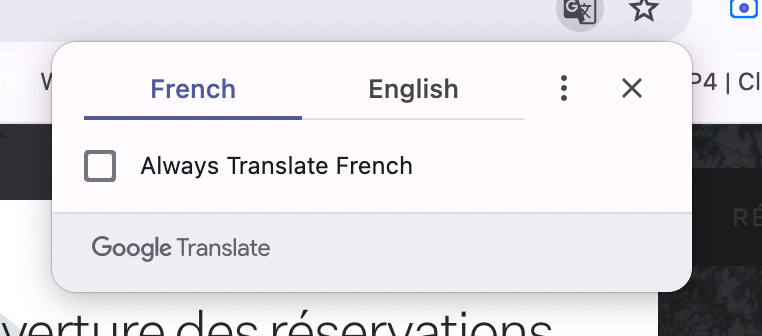
Users can change the language settings, opt-out of automatic translations, or select "Always translate" for a specific language.
-
Clicking on the translation icon in the address bar allows further customization.
-png.png?width=481&height=287&name=Screenshot%20(2)-png.png)
-
-
Automatic Language Detection
-
Chrome can automatically detect the user's preferred language based on browser settings.
-
Users can manually enable or disable automatic translation for specific sites.

-
Limitations of Chrome’s Automatic Translation
While Chrome's automatic translation is useful, it has some limitations:
-
Accuracy: Some translations may not be perfect, especially for complex sentences or technical terms.
-
Formatting Issues: Certain page layouts may be affected after translation.
-
SEO Impact: Since translations are temporary, they don’t affect search engine indexing.
- Platforms: A Google translator app will need to be added to other browsers, though other lesser used platforms tend to have their own version of this feature.
Google Chrome’s built-in translation feature is an effective tool for browsing foreign-language websites. With automatic detection and real-time translation, users can seamlessly access content in their preferred language without needing external plugins or widgets.